Adsense Link 728 X 15;

Google Docs v1.0.54 Apk

Posted by team Sabtu, 25 Februari 2012 0 komentar
Google Docs v1.0.54 Apk - Create, edit, upload and share your documents with the Google Docs app.
* Designed for Android to save you time finding your docs
* Edits to your documents appear to collaborators in seconds
* Make quick changes to spreadsheets
* View your documents, PDFs, presentations and more
* Upload and convert files to the Google Docs format
* Take a photo of printed text and convert it to a Google document
* Share docs with your device’s contacts
* Optimized experience to take advantage of larger screens for tablet users, Honeycomb (Android 3.0+)


v1.0.54 change log:
- Create, view and edit Google documents with our new Android editor
- Rich text formatting (bold, italics, underline, font color, background color)
- Layout tools (bulleted lists, numbered lists, indentation)
- Real-time collaboration – see edits from others in seconds
- Cursor presence and highlighting


Google Docs v1.0.54 Apk
Size : 2.5 MB
Requires Android:2.1 and up
Android Market Link - Visit
Developer - Visit

Download

LuckyPatcher v1.0.13 Apk

Posted by team Jumat, 24 Februari 2012 0 komentar
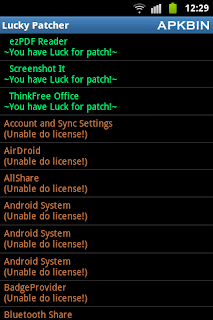
LuckyPatcher v1.0.13 Apk - LuckyPatcher is a great tool to bypass Premium Applications License Verification. Now it can Remove some selected application more applications will add soon. To use this patcher you need a rooted device.

Developed by ChelpuS


v1.0.13 change log:
1. Added language selection, and that confused many Russian.
2. Completely reworked the algorithm custom patch, now it is much faster … and even earlier if the patch of the neutron people thought that the device is stuck, in fact it is so long, he patches
3. In about adding version information.
4. The templates custom patch appeared identifiers [BEGIN] and [CLASSES], but the algorithm is compatible with older versions without these identifiers. After the [BEGIN] on the next line writes a description of the patch, for what program, etc. [CLASSES] all the templates patch after the next line will be used to patch classes.dex.
5. [LIB] – now works with the first line in the template (previously it was necessary to press Enter several times to withdraw from the beginning)
6. Added new function “Remove Google Ads”, yet in beta version, will operate extremely rare, but may be somebody somehow will help in some way. Applications that can be patched by this function are marked with “~ Google Ads Found! ~”.
7. Removed one extra signature for “Remove License Verification!”.
8. Added patch for Rocking Shortcuts Lite 1.4
9. Fixed the Russian name of the program in English.
10. Formatted slightly differently in the text about.
11. The results of custom patch have become more informative if it fails.
12. Removed from the list of all system applications.


LuckyPatcher v1.0.13 Apk
Size : 124 KB
Requires Android:1.6 and up | Root
Android Market Link - Visit
Developer - Visit

Download

Monster Shooter v1.2 Apk

Posted by team 0 komentar
Monster Shooter v1.2 Apk - Just when you thought it couldn't get any better... it did! We took the dual-stick shooter formula and optimized it to deliver the best game we could: Monster Shooter, the new dual-stick mayhem sensation!

IT'S FREE TO PLAY!
Download the game free of charge and prove that you can handle the best mission and progress system. Visit numerous levels across three different planets and enjoy hours of free gameplay!

IT LOOKS AND SOUNDS GREAT!
Hand-drawn 2D ultra violence has never looked this cute. With a vast array of enemies, guns and effects, Monster Shooter is one of the best-looking games of its genre which also runs smoothly on older devices.

WEAPONS AND GEAR KICK BUTTS!
Never underestimate a guy whose cat has been stolen by aliens. As DumDum, you can blast your enemies with shotguns, plasma rifles and rocket launchers and spice things up with a handful of grenades... If they're still moving after that lot, use the nuke! The blood looks and sounds disturbingly fun!

THE MORE AWESOME YOU GET...
The more awesome Monster Shooter gets. Complete multiple missions and improve your rankings. Buy new stuff and show your skills off to other players using the OpenFeint.


Try your skill and luck in Survival mode and see if you've got what it takes to rise right up there with the leaderboard masters. See you at the top!


v1.2 change log:
- qHD (960×540) screen resolution support added
- crashes fixed
- stability improved


Monster Shooter v1.2 Apk
Size : 38 MB
Requires Android:2.1 and up
Android Market Link - Visit
Developer - Visit

Download

LuckyPatcher v1.0.12 Apk

Posted by team Kamis, 23 Februari 2012 0 komentar
LuckyPatcher v1.0.12 Apk - LuckyPatcher is a great tool to bypass Premium Applications License Verification. Now it can Remove some selected application more applications will add soon. To use this patcher you need a rooted device.

Developed by ChelpuS


v1.0.12 change log:
- Not Available


LuckyPatcher v1.0.12 Apk
Size : 124 KB
Requires Android:1.6 and up | Root
Android Market Link - Visit
Developer - Visit

Download


X-plore file manager v2.50 Apk

Posted by team 0 komentar
X-plore file manager v2.50 Apk - X-plore is dual-pane file explorer with tree view and root access.

Highlights:
* Dual-pane tree view
* Root access (on rooted devices), also allowing changes to read-only files
* Shows all internal and external memory locations
* Seamless work with Zip (as if it was normal folder)
* Favorites (folders, Zips) displayable in root
* Basic media info about images, video and audio files
* Built-in viewers for images, video, audio, text
* Hex viewer
* Fast Image viewer with zoom and slide to previous/next images in folder
* Thumbnails for images and video as well as for various file types (depending on associated application)
* Ability to clear default application handlers
* Multi-selection - always available, yet not disturbing
* Search files in folders (also in Zip or in search results)
* View APK files as ZIP
* Configurable buttons and key shortcuts


X-plore allows you to see inside of your Android phone or tablet.

This is a dual-pane explorer, which means that there're two folders shown at same time, and common operation such as copying files are done from one pane to another.
And X-plore shows folder hierarchy in a tree view. This offers clear orientation on where in file system you currently are, and fast switching to other location.

Currently selected folder and files are highlighed, while other folders/files have slighly darker background.

You may explore internals of the device, and if you're power user and have your device rooted, you can make changes to system data - backup files, remove unwanted applications, etc.

If you're standard user, you may choose to hide internal memory from view and be sure not to mess with system.
You can comfortably see contents of your external memories, either be it built-in high capacity memory, external memory card, or possibly USB memory stick attached to your tablet. All these memory types are listed in main level, you don't need to search for their folders on the device.

Where it makes sense, X-plore tries to tell more about the file. This means showing thumbnails for images and video, and displaying basic media information about music files.

Main operations are related to managing files and folders - viewing, copying, moving, deleting, compressing to Zip, extracting, renaming, sharing, and more.

Main interaction is done by touch screen, clicking on folders or files to open files, or long-click to open context menu which contains options which can be done on particular clicked item, or multiple selected items.
Multi-selection allows to do operation on more files at once. Files can be selected by clicking check box. It is also possible to select all files in a folder, or clear selection, by clicking parent folder's check box.

Opening file may mean to use one of built-in viewer for most popular file types: images, audio, video and text.
Or you may configure X-plore to use system application for opening files, in which case system-predefined application that can open particular file is launched.

Archives (currently supported is Zip) are displayed as other folders. You may open them, see contents, and do standard operations that you'd do on files - rename, delete, copy from/to, etc. You don't feel other difference from normal file system, other than operation may be slower for larger Zip files due to need of recompression.

Additional interaction is possible by button bar, which is between two panes, and is fully configurable. You may put buttons of your desired operations here, and change ordering.
Buttons in this bar become enabled or disabled automatically depending on if it is possible to perform given operation.

Another input comes from configurable keyboard shortcuts. Many android devices are mainly controlled by touch screens, and have minimal buttons or keys. Even on such device, you may assign action to volume keys.
And on devices with full hardware keyboard, many operations may be (and are by default) assigned to various keys.


v2.50 change log: - Startup password
- Fixes in: root FS, search FS, external cards, streaming from network, Picasa
- Usage statistics


X-plore file manager v2.50 Apk
Size : 688 KB
Requires Android:2.1 and up
Android Market Link - Visit
Developer - Visit

Download


Let's Golf! 3 HD v1.0.4 Apk

Posted by team 0 komentar
Let's Golf! 3 HD v1.0.4 Apk -  Freemium game! Download and play 5 holes every day for FREE or buy energy boosts to play anytime you want!

The world’s most exciting golf odyssey returns with more great new features that you’ve been waiting for! Everyone can join in this fun and exciting golf adventure. Create your avatar and challenge friends and opponents from across the globe in golf tournaments that are unlike anything you’ve seen before.

WHERE NO ONE HAS GOLFED BEFORE
• Travel to six of the most far-out locations you’ve ever played, from the Great Wall of China to Outer Space!
• Each course is created in 3D so you’ll see every beautiful waterfall, lush forest and distant green as if you were immersed in an adventure.

MULTIPLAYER
• Up to 4 golfers can compete in fun matches online and locally (via Wi-Fi or Bluetooth). By popular request, you can also play on the same device!
• Your friends are not online? Challenge them to beat your score and see who will win the top prize.

SOCIAL LINKS
• Chat live during your online games.
• Invite all your friends to join the Golf Club via Facebook, Gameloft LIVE!, email and more.
• Watch your opponent’s turn during a match! (Feature only available for certain devices.)

BE YOUR OWN GOLFER
• Create your unique golfing avatar from thousands of combinations of clothes, hair, gear and more to match your style, no matter how colorful or down-to-Earth.
• Purchase special skills (like increased range or accuracy for your shots) or balls with special powers (like Tornado, Luck, etc.) using virtual coins you can earn in-game.

GAME MODES
Progressively unlock new modes: Stroke Play, Match Play, Shootout, and Close to Pin.

MINI-GAME MAYHEM
Need a change of pace? Play some challenging mini-games like Catch the Star, Target Range and Putting Master to hone specific skills and become a champion of the links.


v1.0.4 change log:
- New course in France! 9 holes in the majestic location of 'Les Châteaux de la Loire'
- New crazy outfits!
- New cute Japanese pet!
- Mulligan feature (possibility to cancel a shot with cash)
- Minor bug fixes


Let's Golf! 3 HD v1.0.4 Apk
Size : 2.1 MB
Requires Android:2.2 and up
Android Market Link - Visit
Developer - Visit

Download

GO Launcher EX v2.80 Final Apk

Posted by team Rabu, 22 Februari 2012 0 komentar
GO Launcher EX v2.80 Final Apk - Extended version of GO Launcher, one of the most popular home application. GO Launcher is a highly customizable home repalcement application, one of the most popular home apps in Android Market, which will run when you press your android phone’s HOME key.  GO Launcher EX supports hundreds of themes, fast flip speed and tons of useful functions.


Features:
- Hundreds of themes
- Fancy home screen transition
- Smooth scrolling experience
- Icon popup menu
- Folder and task manager in app drawer
- Gesture supported
- Scrollable & resizable widgets supported

Fixed:
- Add shortcut of GO Launcher (Long press home screen-Shortcut- GO Launcher).
- Synchronize home folder and app draw folder.
- Directly drag to change app icon on dock bar.
- Directly open folder on dock bar.
- Add 3D transition for vertical continuous scrolling (MENU-Preferences-Effects Settings-Vertical scroll effect).
- Support single screen wallpaper (MENU-Preferences-Screen Settings-Normal/Portrait Wallpaper).

Tips:
1. Pinch fingers to enter preview screen and edit home screen pages
2. Search “go launcher theme” to get themes and select them in “Themes preferences”
3. Set screen transition and flip speed in “Display settings”
4. Long press icons on home screen to active popup menu
5. Long press icons in app drawer to edit location, uninstall apps and create folders
6. If you can't set GO Launcher as your default home, download "Home manager"

Important:
1. This is a totally free application and we need directly call phone numbers permission to enable the direct dial shortcut on home screen.
2. We will bring out some charged apps like themes and widgets, but most of our apps are free!
3. The weather and clock widget in screenshots belongs to GO Weather, one of the applications developed by our team!
4. The other widgets in screenshots are our GOwidgets, try to search and download them in Android Market!
5. Download our “Classic Theme GO Launcher EX” to get the wallpaper!
6. GO Dev team has released GO Launcher EX, GO SMS, GO Weather and GO Contacts. More and more applications are coming soon!
Think of an extreme makeover to your phone? Try this out!


v2.80 change log:
1. (New) Support holistic theme which can change themes of launcher, widget and locker (Use GO Store to download)
2. (New) Homescreen folder supports to custom icon position
3. (New) Gesture settings add a new option for screen lock (If you use the feature, make sure clean the permission before uninstallation.)
4. (Improve) Rearrange the option list of gesture settings
5. (Fix) Error of folder background when overlapping icons
6. (Fix) Wrong default grid size of Galaxy Nexus


GO Launcher EX v2.80 Final Apk
Size : 4.3 MB
Requires Android:2.0 and up
Android Market Link - Visit
Developer - Visit

Download